Demystifying csecstaskexecutionrole for AWS ECS


The world of cloud-native computing, particularly within Amazon Web Services (AWS), often presents a labyrinth of interconnected services and intricate configurations. Among the myriad components that make up a robust and scalable application on AWS Elastic Container Service (ECS), one particular IAM role frequently emerges as a source of both power and perplexity: ecsTaskExecutionRole. This fundamental role, while seemingly straightforward in its name, underpins a significant portion of the operational capabilities of your containerized workloads. Without a clear and comprehensive understanding of its purpose, permissions, and best practices, developers and architects can find themselves grappling with frustrating deployment failures, mysterious permission denied errors, and potential security vulnerabilities that could compromise their entire application stack.
This article embarks on a detailed journey to demystify ecsTaskExecutionRole. We will peel back the layers of AWS ECS, exploring the core tenets of container orchestration and the critical role Identity and Access Management (IAM) plays in its secure and efficient operation. Our exploration will go beyond a mere definition, delving into the granular permissions required for common scenarios, the crucial distinctions from other IAM roles within ECS, and the architectural implications of its proper configuration. By the end of this comprehensive guide, you will possess the knowledge to confidently configure, troubleshoot, and secure your ecsTaskExecutionRole, empowering you to build more resilient, performant, and secure containerized applications on AWS. We will also touch upon how services deployed with ECS often interact with apis and api gateways, highlighting the comprehensive ecosystem required for modern application delivery.
Understanding the AWS ECS Ecosystem: A Foundation for ecsTaskExecutionRole
Before we immerse ourselves in the specifics of ecsTaskExecutionRole, it's imperative to establish a solid understanding of the broader AWS ECS ecosystem. ECS is a fully managed container orchestration service that allows you to easily run, stop, and manage Docker containers on a cluster. It eliminates the need for you to install and operate your own container orchestration software, managing the underlying infrastructure for you. This abstraction, while powerful, introduces a layer of service-to-service communication and permission management that is distinct from traditional server-based deployments.
At its core, ECS comprises several key components that work in concert to deploy and manage your containerized applications:
- Clusters: A cluster is a logical grouping of tasks or services. You can have multiple clusters to isolate different environments (e.g., development, staging, production) or different application sets. Clusters serve as the boundaries within which your ECS resources operate, providing a centralized management plane.
- Task Definitions: This is the blueprint for your application. A task definition specifies the Docker image to use, the CPU and memory allocated, port mappings, environment variables, logging configuration, and crucially, the IAM roles associated with the task. It dictates how your container should run. This is where you declare the
ecsTaskExecutionRoleand, optionally, anecsTaskRole. - Tasks: A task is an instantiation of a task definition. It represents a running container or a set of tightly coupled containers that share resources. When you run a task, ECS launches one or more containers based on the task definition. Tasks are the fundamental unit of deployment in ECS.
- Services: An ECS service enables you to run and maintain a specified number of instances of a task definition simultaneously. If any task fails or stops for any reason, the service scheduler launches another instance of your task definition to replace it, ensuring the desired task count is maintained. Services are often integrated with Elastic Load Balancers (ELBs) to distribute incoming
apitraffic across healthy tasks. - Container Agent: This is a special process that runs on each EC2 instance (if you're using the EC2 launch type) or is implicitly managed by AWS (for Fargate). The agent is responsible for registering the instance with the ECS cluster, pulling task definitions, starting and stopping containers, and reporting the state of containers back to the ECS control plane. It's the silent workhorse that enables the orchestration.
- Launch Types: ECS offers two primary launch types:
- EC2 Launch Type: You manage the underlying EC2 instances that host your containers. This gives you greater control over the server environment, instance types, and operating system. You are responsible for patching, scaling, and managing these EC2 instances.
- Fargate Launch Type: This is a serverless compute engine for containers. You don't provision, configure, or scale EC2 instances. Fargate manages the underlying infrastructure, allowing you to focus solely on your containerized applications. While you don't interact with instances directly, Fargate still relies on a sophisticated internal execution environment that requires permissions to operate, which is where
ecsTaskExecutionRolebecomes paramount.
Within this intricate ecosystem, IAM roles play a pivotal role in securing access and defining permissions. Every interaction, whether it's an ECS agent pulling an image or a containerized application interacting with an S3 bucket or an external api, must be authorized by an appropriate IAM role. Misconfiguring these roles can lead to critical operational failures and significant security exposures.
The Core Purpose of ecsTaskExecutionRole
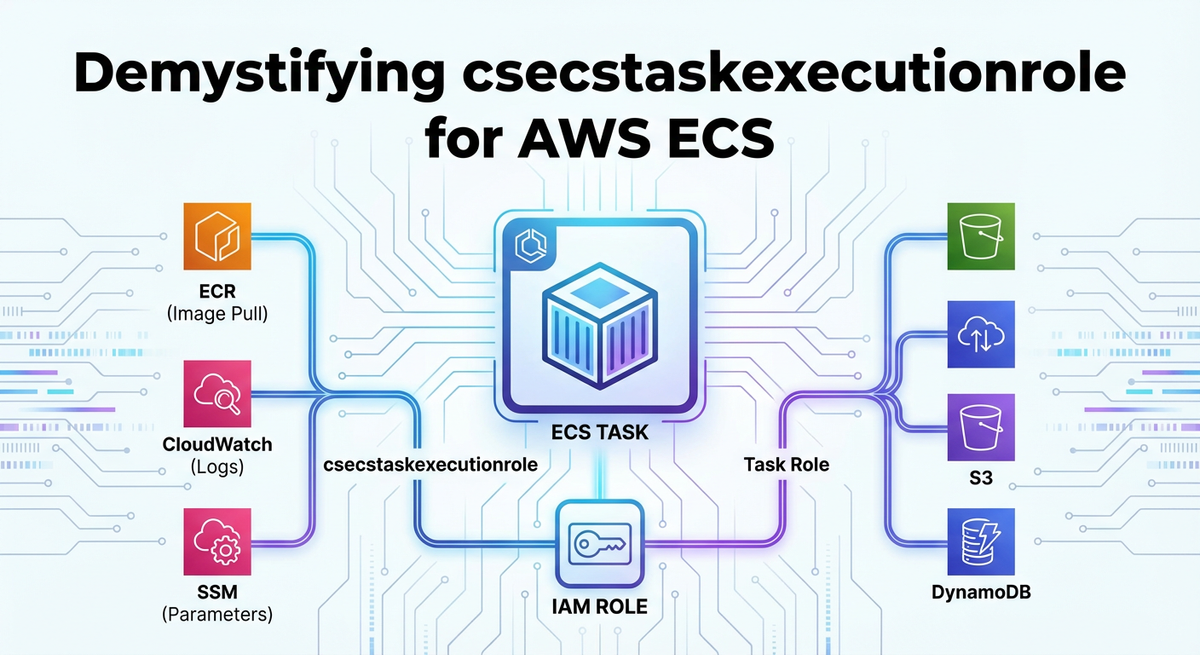
The ecsTaskExecutionRole is a highly specialized IAM role designed to grant permissions to the Amazon ECS container agent and the Fargate infrastructure when they need to perform actions on behalf of your tasks. It is not, as often mistakenly assumed, the role that your application inside the container uses to access other AWS services. That distinction is critical and will be elaborated upon shortly.
Think of the ecsTaskExecutionRole as the identity badge for the operational aspects of your container. When ECS needs to do something for your task before your application even starts, or when it needs to report on your task's status, it assumes this role. This includes a variety of crucial backend operations without which your tasks simply wouldn't be able to launch or operate correctly.
Here's a breakdown of the key responsibilities and actions that ecsTaskExecutionRole enables:
- Pulling Container Images from Registries:
- When your task definition specifies a Docker image, the ECS agent (or Fargate infrastructure) needs to download that image. If your image is stored in Amazon Elastic Container Registry (ECR), the
ecsTaskExecutionRolemust have permissions to authenticate with ECR and retrieve the specified image layers. Without these permissions, your task will fail to launch, often with anImagePullFailederror. This is one of the most common configuration pitfalls.
- When your task definition specifies a Docker image, the ECS agent (or Fargate infrastructure) needs to download that image. If your image is stored in Amazon Elastic Container Registry (ECR), the
- Sending Container Logs to Amazon CloudWatch Logs:
- Most production applications require robust logging for monitoring, debugging, and auditing. If your task definition is configured to use the
awslogslog driver (the most common choice for ECS), theecsTaskExecutionRoleneeds permissions to create log groups, create log streams, and put log events into CloudWatch Logs. If these permissions are missing, your application's logs might never reach CloudWatch, making troubleshooting virtually impossible.
- Most production applications require robust logging for monitoring, debugging, and auditing. If your task definition is configured to use the
- Accessing Secrets and Configuration from AWS Secrets Manager or SSM Parameter Store:
- It's a best practice to inject sensitive data like database credentials, API keys, or configuration parameters into your containers at runtime, rather than hardcoding them into images. ECS integrates seamlessly with AWS Secrets Manager and AWS Systems Manager Parameter Store for this purpose. If your task definition references secrets or parameters, the
ecsTaskExecutionRolemust have the necessary permissions to retrieve these values from Secrets Manager or Parameter Store. This often includessecretsmanager:GetSecretValueorssm:GetParametersand potentiallykms:Decryptif the secrets are encrypted with a custom KMS key.
- It's a best practice to inject sensitive data like database credentials, API keys, or configuration parameters into your containers at runtime, rather than hardcoding them into images. ECS integrates seamlessly with AWS Secrets Manager and AWS Systems Manager Parameter Store for this purpose. If your task definition references secrets or parameters, the
- Registering and Deregistering Network Interfaces (for Fargate Launch Type):
- For Fargate tasks, AWS manages the underlying network infrastructure. The
ecsTaskExecutionRoleimplicitly needs permissions to interact with Amazon VPC to provision and attach Elastic Network Interfaces (ENIs) to the task. While you typically don't explicitly add these permissions to the role's policy (they are handled by AWS-managed policies), understanding this underlying mechanism clarifies the scope of the role.
- For Fargate tasks, AWS manages the underlying network infrastructure. The
- Downloading Data from Amazon S3 (e.g., for volume population):
- In some advanced scenarios, you might need to populate a volume on your container with data from S3 before your application starts. For example, a configuration file, a machine learning model, or initial data sets. If this is specified in your task definition, the
ecsTaskExecutionRolewould needs3:GetObjectpermissions for the relevant S3 bucket and objects.
- In some advanced scenarios, you might need to populate a volume on your container with data from S3 before your application starts. For example, a configuration file, a machine learning model, or initial data sets. If this is specified in your task definition, the
- Reporting Task State to the ECS Control Plane:
- The ECS agent continually communicates with the ECS control plane, reporting the status of tasks (e.g.,
PROVISIONING,PENDING,RUNNING,STOPPED). This communication is implicit and vital for ECS to maintain the desired state of your services. While specific permissions for this are usually part of AWS-managed policies, it highlights the role's foundational nature in the orchestration process.
- The ECS agent continually communicates with the ECS control plane, reporting the status of tasks (e.g.,
In essence, ecsTaskExecutionRole is the "janitor" and "preparer" for your container. It sets up the environment, fetches what's needed, and ensures the container is ready to run before handing over control to your actual application. Neglecting its proper configuration is akin to sending a worker to a job site without the right tools or instructions, leading to inevitable delays and failures.
ecsTaskExecutionRole vs. ecsTaskRole: A Crucial Distinction
One of the most common sources of confusion for those new to AWS ECS is differentiating between ecsTaskExecutionRole and ecsTaskRole. While both are IAM roles specified in a task definition, they serve fundamentally different purposes and grant permissions to different entities. Understanding this distinction is paramount for both security and operational correctness.
Let's clarify their distinct roles:
ecsTaskExecutionRole(The Execution Role):- Who uses it? The Amazon ECS container agent (on EC2 launch type) or the Fargate infrastructure (on Fargate launch type).
- What is it for? Operations related to the management and lifecycle of the container itself, before your application code even begins to execute. This includes pulling images, sending logs, retrieving secrets, and network setup.
- Best Practice: Keep its permissions as narrow as possible, focusing purely on these execution-related tasks. It should not contain permissions that your application code needs.
ecsTaskRole(The Task Role / Application Role):- Who uses it? Your application code inside the container.
- What is it for? Granting permissions for your application to interact with other AWS services. For example, if your application needs to:
- Read from or write to an S3 bucket (
s3:GetObject,s3:PutObject). - Interact with a DynamoDB table (
dynamodb:GetItem,dynamodb:PutItem). - Publish messages to an SQS queue (
sqs:SendMessage). - Invoke a Lambda function (
lambda:InvokeFunction). - Access a private
apior anapi gatewayprotected by IAM.
- Read from or write to an S3 bucket (
- Best Practice: This role should also adhere to the principle of least privilege, granting only the specific permissions required by your application's logic.
Analogy: Imagine you're moving into a new apartment. * The ecsTaskExecutionRole is like the moving company. Their job is to get your furniture (container image) from the storage facility (ECR), set up the utilities (CloudWatch logs), and unlock the door with the key (Secrets Manager) so you can move in. They don't touch your personal belongings or decide how you decorate. * The ecsTaskRole is you. Once you're in the apartment, you use your own credentials to access your bank account (DynamoDB), order groceries (SQS), or invite friends over (Lambda invocation). The moving company has no business with your personal affairs.
Why the Separation is Crucial: This separation of concerns is fundamental for security. If you were to grant your application's permissions to the ecsTaskExecutionRole, you would be giving the underlying ECS agent far more power than it needs. This creates a larger attack surface. Conversely, if you tried to put image pull permissions in the ecsTaskRole, your tasks would fail to launch because the ECS agent, not your application, is the entity that needs to pull the image.
The following table summarizes the key differences:
| Feature | ecsTaskExecutionRole |
ecsTaskRole |
|---|---|---|
| Who assumes the role? | ECS Container Agent / Fargate Infrastructure | Application code inside the container |
| Purpose | Task lifecycle management: image pulls, logging, secrets | Application-specific interactions with AWS services |
| Permissions Examples | ecr:GetAuthorizationToken, logs:PutLogEvents, secretsmanager:GetSecretValue |
s3:GetObject, dynamodb:PutItem, sqs:SendMessage |
| When is it needed? | For all ECS tasks to launch and operate correctly | Only if your application code needs to interact with AWS services |
| Security Principle | Least privilege for execution tasks | Least privilege for application tasks |
| Typical Policy | AmazonECSTaskExecutionRolePolicy (managed) + custom |
Custom policy specific to application needs |
Understanding this distinction is not just an academic exercise; it is a practical necessity for architecting secure and functional containerized applications on AWS.
Constructing the ecsTaskExecutionRole: Permissions Explained
Now that we understand the purpose and distinction, let's dive into the practical aspect of constructing the ecsTaskExecutionRole. While AWS provides a managed policy, AmazonECSTaskExecutionRolePolicy, as a convenient starting point, you will often need to create custom policies or attach additional inline policies to meet specific requirements.
The AmazonECSTaskExecutionRolePolicy typically includes the following permissions:
{
    "Version": "2012-10-17",
    "Statement": [
        {
            "Effect": "Allow",
            "Action": [
                "ecr:GetAuthorizationToken",
                "ecr:BatchCheckLayerAvailability",
                "ecr:GetDownloadUrlForLayer",
                "ecr:BatchGetImage"
            ],
            "Resource": "*"
        },
        {
            "Effect": "Allow",
            "Action": [
                "logs:CreateLogGroup",
                "logs:CreateLogStream",
                "logs:PutLogEvents"
            ],
            "Resource": "*"
        },
        {
            "Effect": "Allow",
            "Action": [
                "s3:GetObject",
                "s3:PutObject"
            ],
            "Resource": [
                "arn:aws:s3:::ecs-artifacts-*"
            ]
        }
    ]
}
Let's break down each block and discuss common additions:
1. Amazon ECR Permissions
{
    "Effect": "Allow",
    "Action": [
        "ecr:GetAuthorizationToken",
        "ecr:BatchCheckLayerAvailability",
        "ecr:GetDownloadUrlForLayer",
        "ecr:BatchGetImage"
    ],
    "Resource": "*"
}
ecr:GetAuthorizationToken: This permission allows the ECS agent to request an authentication token from ECR. This token is crucial for Docker to authenticate with ECR and pull images securely. Without it, Docker will be unable to log in to your ECR registry.ecr:BatchCheckLayerAvailability: After authentication, the agent needs to check which layers of the Docker image are available in the ECR repository. This helps optimize downloads by avoiding redundant pulls.ecr:GetDownloadUrlForLayer: This action grants permission to retrieve the actual download URLs for the image layers.ecr:BatchGetImage: This allows the agent to download multiple images or image layers in a batch, improving efficiency.
Resource Specificity: While Resource: "*" is common here, for heightened security, you could limit this to specific ECR repositories if your tasks only ever pull from a known set of repositories. However, in dynamic environments, "*" often simplifies management.
2. Amazon CloudWatch Logs Permissions
{
    "Effect": "Allow",
    "Action": [
        "logs:CreateLogGroup",
        "logs:CreateLogStream",
        "logs:PutLogEvents"
    ],
    "Resource": "*"
}
logs:CreateLogGroup: Allows the ECS agent to create a new log group in CloudWatch if one doesn't already exist for your task's log configuration. While you typically pre-create log groups, this provides resilience.logs:CreateLogStream: Permits the creation of log streams within a log group. Each task instance usually gets its own log stream for organized logging.logs:PutLogEvents: This is the core permission, allowing the agent to send log events from your container to the specified CloudWatch log stream.
Resource Specificity: It is highly recommended to restrict the Resource for CloudWatch Logs to specific log groups, especially in larger organizations. For example, arn:aws:logs:REGION:ACCOUNT_ID:log-group:/ecs/*:* would allow logging to any log group starting with /ecs/. This prevents tasks from writing logs to arbitrary log groups, which could be a security or cost concern.
3. Amazon S3 Permissions (for ECS Artifacts)
{
    "Effect": "Allow",
    "Action": [
        "s3:GetObject",
        "s3:PutObject"
    ],
    "Resource": [
        "arn:aws:s3:::ecs-artifacts-*"
    ]
}
This section is less frequently needed for basic task execution but can be crucial for specific scenarios where ECS might store or retrieve internal artifacts. The Resource is usually restricted to AWS-managed S3 buckets (ecs-artifacts-*). Unless you have specific reasons to modify or extend this for your own S3 interactions during task execution setup (e.g., pulling configuration files directly into a volume before the application starts), this part of the policy often remains as is or is removed if not using features that require it. Note that any S3 access by your application should use the ecsTaskRole.
Common Additional Permissions for ecsTaskExecutionRole
While the managed policy covers the basics, modern containerized applications often leverage other AWS services that require ecsTaskExecutionRole to be updated.
a. AWS Secrets Manager Integration
If your task definition references secrets from AWS Secrets Manager (e.g., secrets field in task definition container definitions), you'll need:
{
    "Effect": "Allow",
    "Action": [
        "secretsmanager:GetSecretValue",
        "kms:Decrypt"
    ],
    "Resource": [
        "arn:aws:secretsmanager:REGION:ACCOUNT_ID:secret:SECRET_NAME-*"
        // Or if using default KMS key:
        // "arn:aws:kms:REGION:ACCOUNT_ID:key/KMS_KEY_ID_FOR_SECRET"
    ]
}
secretsmanager:GetSecretValue: Allows the ECS agent to retrieve the content of a specific secret.kms:Decrypt: If your secrets are encrypted with AWS Key Management Service (KMS) customer-managed keys (CMKs), theecsTaskExecutionRoleneeds permission to decrypt them. TheResourceshould point to the specific KMS key ARN used for encryption. If using AWS-managed KMS keys for Secrets Manager, this permission might not be explicitly needed as it's often handled implicitly.
b. AWS Systems Manager Parameter Store Integration
Similarly, if using SSM Parameter Store for configuration:
{
    "Effect": "Allow",
    "Action": [
        "ssm:GetParameters",
        "ssm:GetParameter",
        "ssm:GetParametersByPath",
        "kms:Decrypt" // If encrypted parameters are used
    ],
    "Resource": [
        "arn:aws:ssm:REGION:ACCOUNT_ID:parameter/PATH/TO/PARAMETER"
        // Or specific parameter ARNs
    ]
}
ssm:GetParameters/ssm:GetParameter/ssm:GetParametersByPath: These actions allow retrieving parameters.GetParametersByPathis particularly useful for retrieving multiple parameters under a specific hierarchy.kms:Decrypt: Required if you're usingSecureStringparameters encrypted with a CMK.
c. Cross-Account ECR Pulls
In scenarios where your ECR repository resides in a different AWS account than your ECS cluster, the ecsTaskExecutionRole needs permission to access that cross-account ECR. This typically involves:
- Granting permissions in the ECR repository policy in the source account to allow the
ecsTaskExecutionRoleARN from the destination account to access it. - Ensuring the
ecsTaskExecutionRolein the destination account has theecr:*permissions (as described above).
This is a more complex configuration, requiring careful coordination between IAM policies in both accounts.
APIPark is a high-performance AI gateway that allows you to securely access the most comprehensive LLM APIs globally on the APIPark platform, including OpenAI, Anthropic, Mistral, Llama2, Google Gemini, and more.Try APIPark now! 👇👇👇
Best Practices and Security Considerations for ecsTaskExecutionRole
Configuring ecsTaskExecutionRole correctly is not just about functionality; it's profoundly about security. A misconfigured or overly permissive role can create significant vulnerabilities. Adhering to best practices ensures both operational efficiency and a strong security posture.
- Principle of Least Privilege: This is the golden rule of IAM. Grant only the absolute minimum permissions required for the
ecsTaskExecutionRoleto perform its duties. Avoid"*"forActionorResourceunless absolutely necessary and thoroughly justified (e.g.,ecr:GetAuthorizationTokenoften needsResource: "*"). Forlogs:*andsecretsmanager:*, always try to specify the exact log groups, secret ARNs, or parameter ARNs. Over-privileging this role could allow an attacker who compromises an ECS agent (a highly unlikely but theoretically possible scenario) to gain broad access to your AWS environment. - Use AWS Managed Policies as a Baseline, but Customize: The
AmazonECSTaskExecutionRolePolicyis a good starting point, providing the core necessary permissions. However, it's rare that it will perfectly fit all your needs without additions for secrets, SSM, or custom S3 interactions. Create your own customer-managed policies that attach to yourecsTaskExecutionRoleor use inline policies if the permissions are unique to that specific role. Avoid creating new roles that simply duplicate or slightly modify AWS managed policies; instead, build upon them. - Regular Audits and Monitoring: Periodically review the permissions granted to your
ecsTaskExecutionRole(and all IAM roles). Use AWS IAM Access Analyzer to identify unintended access. Integrate CloudTrail logs with CloudWatch Alarms to monitor for unusual activity related to IAM role assumption or actions performed by theecsTaskExecutionRole. Tools like AWS Config can help enforce compliance by detecting non-compliant IAM policies. - Infrastructure as Code (IaC): Always define your
ecsTaskExecutionRoleand its associated policies using IaC tools like AWS CloudFormation or Terraform. This ensures version control, repeatability, and consistency across environments. Manual configuration is prone to errors and drift, making auditing and security harder. - Avoid Using
ecsTaskExecutionRolefor Application Logic: As emphasized earlier, never grant application-specific permissions (e.g.,s3:PutObjectfor your application to upload files,dynamodb:PutItemfor your application to write to a database) to theecsTaskExecutionRole. These belong strictly to theecsTaskRole. Mixing concerns not only creates security risks but also complicates troubleshooting. - KMS Key Policies: If your
ecsTaskExecutionRoleneedskms:Decryptpermissions for Secrets Manager or SSM Parameter Store, ensure that the KMS Key Policy itself also grants permission to theecsTaskExecutionRoleto use the key. A role policy allowingkms:Decryptis useless if the key policy explicitly denies or doesn't grant that role access. This is a common oversight. - Service Control Policies (SCPs) and Permission Boundaries: For larger organizations, enforce guardrails using AWS Organizations Service Control Policies (SCPs) to restrict the maximum permissions that can be granted to any IAM entity, including
ecsTaskExecutionRole. For even finer control, consider using permission boundaries for your IAM roles to set an upper limit on the permissions that a role can ever have, regardless of the policies attached to it.
By diligently applying these best practices, you can transform the ecsTaskExecutionRole from a potential security loophole into a robust and reliable enabler of your containerized workloads.
Troubleshooting Common ecsTaskExecutionRole Issues
Despite best intentions and careful configuration, issues with ecsTaskExecutionRole can arise. Many common ECS task failures trace back to incorrect or insufficient permissions in this role. Here's a guide to troubleshooting some of the most frequent problems:
1. Task Stuck in PENDING or PROVISIONING State
- Symptom: Your ECS task remains in a
PENDINGorPROVISIONINGstate for an extended period and eventually fails. - Possible Causes:
- Image Pull Failure: The
ecsTaskExecutionRolelacks permissions to pull the Docker image from ECR. - Secret/Parameter Retrieval Failure: The role cannot access Secrets Manager or SSM Parameter Store for referenced values.
- Networking Issues (Fargate): Less common for
ecsTaskExecutionRolespecifically, but underlying network configuration can cause tasks to be unable to provision ENIs.
- Image Pull Failure: The
- Troubleshooting Steps:
- Check Task Events: Use
aws ecs describe-tasks --cluster YOUR_CLUSTER --task YOUR_TASK_ARNto look for specific error messages in thestoppedReasonfield or in the task's events. Look forImagePullFailed,AccessDeniedException, or messages related to secret retrieval. - Verify ECR Permissions: Ensure the
ecsTaskExecutionRolehasecr:GetAuthorizationToken,ecr:BatchCheckLayerAvailability,ecr:GetDownloadUrlForLayer,ecr:BatchGetImage. Test pulling the image manually from a machine with similar IAM permissions usingdocker loginanddocker pull. - Verify Secrets/SSM Permissions: Double-check
secretsmanager:GetSecretValueorssm:GetParametersandkms:Decryptpermissions on the correct resources. Test retrieving the secret/parameter manually using the AWS CLI with an IAM user that has the same permissions as yourecsTaskExecutionRole.
- Check Task Events: Use
2. No Logs Appearing in CloudWatch
- Symptom: Your container logs are not appearing in the expected CloudWatch Log Group.
- Possible Causes:
- Missing CloudWatch Logs Permissions: The
ecsTaskExecutionRolelackslogs:CreateLogGroup,logs:CreateLogStream, orlogs:PutLogEvents. - Incorrect Log Group Name: The
awslogs-groupparameter in your task definition's log configuration points to a non-existent or misspelled log group.
- Missing CloudWatch Logs Permissions: The
- Troubleshooting Steps:
- Verify
ecsTaskExecutionRolePolicy: Confirm the role has the necessarylogs:*actions for the specified CloudWatch Log Group. Ensure the resource ARN is correct if it's not*. - Check Log Group Existence: Manually verify in the CloudWatch console that the log group specified in your task definition exists.
- Examine ECS Agent Logs (EC2 Launch Type): If using EC2 launch type, SSH into the EC2 instance and check the ECS agent logs (usually
/var/log/ecs/ecs-agent.log) for errors related to log delivery.
- Verify
3. AccessDeniedException When Retrieving Secrets/Parameters
- Symptom: Your task fails to start or your application crashes during startup with an
AccessDeniedExceptionwhen trying to access a secret or parameter. - Possible Causes:
- Insufficient Permissions: The
ecsTaskExecutionRoledoes not havesecretsmanager:GetSecretValueorssm:GetParametersfor the specific secret/parameter ARN. - KMS Decryption Failure: If the secret/parameter is encrypted, the
ecsTaskExecutionRolelackskms:Decryptpermission on the correct KMS key, or the KMS key policy does not allow the role to decrypt. - Incorrect Secret/Parameter ARN: A typo or incorrect ARN in the task definition.
- Insufficient Permissions: The
- Troubleshooting Steps:
- Check
ecsTaskExecutionRolePolicy: Verify that the policy explicitly grantssecretsmanager:GetSecretValueorssm:GetParametersfor the exact ARN of the secret/parameter. - Check KMS Key Policy: If KMS is involved, go to the KMS console, find the key used to encrypt the secret, and ensure its key policy grants
kms:Decryptto yourecsTaskExecutionRole. This is a common missing link. - Use IAM Policy Simulator: A powerful tool to test if a specific IAM role has permission to perform a specific action on a resource. Provide the
ecsTaskExecutionRoleARN, the action (e.g.,secretsmanager:GetSecretValue), and the resource ARN (your secret).
- Check
4. Tasks Fail to Register with Load Balancer (Less Common for ecsTaskExecutionRole)
- Symptom: ECS tasks are running, but they never register as healthy targets with the associated Elastic Load Balancer (ELB) Target Group.
- Possible Causes: This is rarely an
ecsTaskExecutionRoleissue. More likely:ecsTaskRolePermissions: If your application needs to update the load balancer (e.g., dynamically register itself), then this would be anecsTaskRoleconcern.- Security Groups: Ingress rules on the task's security group or egress rules on the load balancer's security group might be blocking health checks.
- Health Check Misconfiguration: Incorrect health check path, port, or status codes in the target group or task definition.
- Application Not Listening: Your containerized application isn't listening on the expected port or isn't responding to health checks.
- Troubleshooting Steps: Focus on
ecsTaskRole(if applicable), security groups, ELB target group health check configuration, and application logs (if logs are working, thanks toecsTaskExecutionRole!).
Effective troubleshooting hinges on understanding the distinct responsibilities of ecsTaskExecutionRole and ecsTaskRole, coupled with diligent use of AWS logging, monitoring, and IAM debugging tools.
Advanced Scenarios and the Broader Ecosystem: API, Gateway, and APIPark
While ecsTaskExecutionRole handles the internal orchestration mechanics, the ultimate goal of deploying applications on ECS is often to expose functionality to users or other services, typically through an api. Modern microservices architectures heavily rely on apis and an api gateway to manage external access, security, routing, and performance. This is where the world of ECS tasks, their internal permissions, and their external interfaces converge.
Your containerized applications, once running securely within ECS thanks to properly configured ecsTaskExecutionRole and ecsTaskRole, will often expose RESTful apis or other service endpoints. These internal services, while robust and scalable, typically don't face the internet directly. Instead, they sit behind an api gateway.
The Role of an API Gateway
An api gateway acts as a single entry point for all client requests, routing them to the appropriate backend services. In an AWS context, this is frequently Amazon API Gateway. However, depending on specific needs for features, control, or open-source solutions, other api gateways are prevalent. A robust api gateway provides several crucial functions:
- Request Routing: Directing incoming
apirequests to the correct ECS service, Lambda function, or other backend. - Authentication and Authorization: Securing
apiaccess, integrating with IAM, Cognito, or custom authorizers. - Traffic Management: Throttling, rate limiting, and caching to protect backend services from overload.
- Request/Response Transformation: Modifying payloads to match backend requirements or client expectations.
- Monitoring and Logging: Centralized tracking of
apicalls for auditing and performance analysis. - Version Management: Seamlessly introducing new
apiversions without disrupting existing clients.
When your ECS service instances are running, receiving traffic from an api gateway, the ecsTaskExecutionRole has already done its job. The permissions related to api gateway integrations (e.g., allowing the api gateway to invoke your ECS service via a Network Load Balancer or Application Load Balancer) are handled by separate IAM roles assumed by the api gateway itself, or by the ecsTaskRole if your application needs to register/deregister from discovery services or interact with api gateway directly.
Introducing APIPark: An Open Source AI Gateway & API Management Platform
Managing a growing number of apis, especially those that incorporate artificial intelligence, introduces its own set of complexities. This is particularly true when you're deploying diverse services on ECS, some of which might be traditional REST services and others AI inference endpoints. The need for a unified approach to api management, authentication, cost tracking, and prompt engineering becomes critical.
This is precisely where solutions like APIPark come into play. APIPark is an all-in-one AI gateway and api developer portal that is open-sourced under the Apache 2.0 license. It's designed to help developers and enterprises manage, integrate, and deploy AI and REST services with ease. While ecsTaskExecutionRole ensures your tasks can run, APIPark complements this by providing a powerful layer for how those tasks, particularly those running AI models, are exposed and managed as apis.
Consider a scenario where you've deployed several machine learning inference services on ECS using Fargate. Each service might use a different underlying AI model or require specific prompt engineering. Managing the api endpoints for these services, ensuring consistent access patterns, and tracking their usage can be challenging. APIPark streamlines this by offering:
- Quick Integration of 100+ AI Models: You can unify the management of various AI models, standardizing authentication and cost tracking, regardless of whether they are hosted on your ECS cluster or third-party services.
- Unified
APIFormat for AI Invocation: It standardizes the request data format across all AI models. This means changes in AI models or prompts won't necessarily break your consuming applications or microservices, simplifying maintenance and usage. Your ECS tasks can focus on the core inference logic, while APIPark handles theapiabstraction. - Prompt Encapsulation into REST
API: Users can quickly combine AI models with custom prompts to create newapis (e.g., sentiment analysis, translation). This allows your ECS-hosted AI tasks to be exposed as highly flexible and customizableapis through APIPark, abstracting away the underlying complexity. - End-to-End
APILifecycle Management: From design and publication to invocation and decommission, APIPark helps regulateapimanagement processes, including traffic forwarding, load balancing, and versioning. This effectively acts as an advancedapi gatewayfor your ECS services, particularly beneficial for complex microservice architectures.
In essence, ecsTaskExecutionRole handles the low-level permissions for bringing up your container, pulling images, and shipping logs. Your ecsTaskRole grants permissions for your application to interact with other AWS services. APIPark then sits at a higher architectural level, managing how the services running within your ECS tasks are presented as polished, secure, and easily consumable apis to the outside world, especially those involving AI. It provides the crucial management layer that complements the robust infrastructure provided by AWS ECS.
For businesses looking to quickly deploy AI models or manage a large portfolio of REST apis, APIPark provides an invaluable platform to enhance efficiency, security, and data optimization, working hand-in-hand with services like AWS ECS to deliver scalable and powerful applications.
Future Trends and Evolution
The landscape of containerization and cloud computing is constantly evolving. As AWS ECS and Fargate continue to mature, so too will the nuances of managing IAM roles like ecsTaskExecutionRole.
- Enhanced Granularity in IAM: We can expect AWS to continue offering more granular control over permissions, potentially introducing fine-grained actions for even more specific execution-related tasks. This will further bolster the principle of least privilege.
- Automation and AI for IAM: As environments become more complex, AI-powered tools might emerge to automatically suggest and refine IAM policies based on observed behavior, reducing the burden on human operators and minimizing misconfigurations.
- Increased Integration with Security Services: Tighter integration with services like AWS Security Hub, Amazon GuardDuty, and Amazon Inspector will provide even better visibility and proactive security monitoring for the permissions granted to
ecsTaskExecutionRole. - Serverless First Approach: With the increasing adoption of Fargate, the underlying management by AWS will become even more seamless. While
ecsTaskExecutionRolewill remain essential, the focus might shift further towards ensuring the task definition accurately reflects all necessary external dependencies (secrets, logs) that the execution role needs to fulfill. - The Proliferation of
APIs andGateways: As microservices and serverless functions become the default for new applications, the reliance onapis will only grow. Advancedapi gatewaysolutions, whether native AWS offerings or open-source platforms like APIPark, will become indispensable for managing this complexity, especially with the surge in AI-drivenapis. They will abstract away the intricacies of the backend (like your ECS tasks) and present a unified, secure, and highly performant interface to consumers.
Staying abreast of these trends and continually reviewing your IAM configurations, including ecsTaskExecutionRole, will be crucial for maintaining secure, efficient, and future-proof cloud-native applications.
Conclusion
Demystifying ecsTaskExecutionRole is more than just understanding an IAM role; it's about gaining a deeper appreciation for the intricate dance between AWS services that enables robust container orchestration. This unsung hero of AWS ECS is the silent enabler of your containerized applications, responsible for the fundamental tasks that bring your Docker images to life within the AWS ecosystem. From pulling container images from ECR to ensuring your logs reach CloudWatch and your secrets are securely retrieved, ecsTaskExecutionRole lays the groundwork for every successful task execution.
We have meticulously explored its core purpose, distinguished it from the application-focused ecsTaskRole, detailed the essential permissions for common scenarios, and outlined critical best practices for security and operational excellence. By adhering to the principle of least privilege, leveraging Infrastructure as Code, and regularly auditing your IAM policies, you can transform potential vulnerabilities into robust safeguards.
Furthermore, we've contextualized ecsTaskExecutionRole within the broader landscape of modern application delivery, recognizing that while it handles the internal mechanics, the external face of your ECS services often relies on sophisticated apis and an api gateway. Solutions like APIPark exemplify how specialized api gateway and management platforms extend the capabilities of ECS by providing crucial layers for api lifecycle management, especially for complex AI and REST services.
Armed with this comprehensive understanding, you are now better equipped to design, deploy, and troubleshoot your containerized workloads on AWS ECS with confidence and precision. The journey through the cloud is often complex, but with clarity on foundational components like ecsTaskExecutionRole, you can build more secure, scalable, and resilient applications that meet the demands of tomorrow.
Frequently Asked Questions (FAQs)
1. What is the primary difference between ecsTaskExecutionRole and ecsTaskRole?
The ecsTaskExecutionRole is assumed by the AWS ECS container agent or Fargate infrastructure to perform actions on behalf of the task during its lifecycle (e.g., pulling images, sending logs to CloudWatch, retrieving secrets). The ecsTaskRole, on the other hand, is assumed by your application code inside the container to interact with other AWS services (e.g., writing to S3, querying DynamoDB, invoking a Lambda function). The ecsTaskExecutionRole sets up the environment, while the ecsTaskRole provides permissions for the application's runtime logic.
2. What are the most common permissions required for ecsTaskExecutionRole?
The most common and essential permissions for ecsTaskExecutionRole include: * ECR Access: ecr:GetAuthorizationToken, ecr:BatchCheckLayerAvailability, ecr:GetDownloadUrlForLayer, ecr:BatchGetImage to pull container images. * CloudWatch Logs: logs:CreateLogGroup, logs:CreateLogStream, logs:PutLogEvents to send container logs. * Secrets/Parameters: secretsmanager:GetSecretValue (for AWS Secrets Manager) and ssm:GetParameters (for SSM Parameter Store), often accompanied by kms:Decrypt if encrypted values are used.
3. How can I troubleshoot an ImagePullFailed error related to ecsTaskExecutionRole?
An ImagePullFailed error almost always indicates that your ecsTaskExecutionRole lacks the necessary permissions to access your container registry, typically ECR. 1. Verify ECR Permissions: Ensure the ecsTaskExecutionRole policy includes all ecr:* actions mentioned in Q2. 2. Check Resource ARNs: Make sure the Resource in your ECR policy statement is correctly configured, either as * or specific ECR repository ARNs. 3. Cross-Account Access: If pulling from a different AWS account, verify that both the ecsTaskExecutionRole in your ECS account and the ECR repository policy in the source account are correctly configured to allow cross-account access. 4. Network Connectivity: Though less common, ensure there are no network issues preventing communication with ECR (e.g., VPC endpoints for ECR, NAT Gateway if in private subnets).
4. Is it safe to use Resource: "*" in my ecsTaskExecutionRole policies?
While Resource: "*" is often used for actions like ecr:GetAuthorizationToken because the token applies to all registries, it is generally recommended to restrict the Resource to specific ARNs whenever possible. For actions like logs:PutLogEvents or secretsmanager:GetSecretValue, explicitly defining the log group ARNs or secret ARNs (e.g., arn:aws:logs:REGION:ACCOUNT_ID:log-group:/ecs/my-app:*) enhances security by adhering to the principle of least privilege. Using Resource: "*" broadly increases the blast radius if the role were ever compromised.
5. Where does APIPark fit into an AWS ECS architecture, considering ecsTaskExecutionRole?
ecsTaskExecutionRole handles the low-level operational permissions for your ECS tasks (image pulls, logging, secrets). APIPark operates at a higher architectural level, managing how the services running within your ECS tasks are exposed and consumed as apis, especially for AI and REST services. It acts as an advanced api gateway and management platform, providing features like unified api formats, prompt encapsulation, authentication, traffic management, and lifecycle governance for the apis your ECS applications expose. APIPark complements ECS by streamlining the external management and consumption of your containerized services, enhancing developer experience and operational efficiency for your apis.
🚀You can securely and efficiently call the OpenAI API on APIPark in just two steps:
Step 1: Deploy the APIPark AI gateway in 5 minutes.
APIPark is developed based on Golang, offering strong product performance and low development and maintenance costs. You can deploy APIPark with a single command line.
curl -sSO https://download.apipark.com/install/quick-start.sh; bash quick-start.sh

In my experience, you can see the successful deployment interface within 5 to 10 minutes. Then, you can log in to APIPark using your account.

Step 2: Call the OpenAI API.